Banner Background
Web App

Craiveco

Enterprise-grade restaurant management platform featuring an intuitive customer app for seamless ordering and bill splitting, a powerful staff app with role-based access control, and a comprehensive owner dashboard for multi-location analytics. This full-stack solution integrates real-time WebSocket communication, secure Stripe payments, and scalable cloud architecture to maximize restaurant efficiency and revenue growth. Built with React Native for mobile, Node.js backend, and Docker containerization for reliable deployment across multiple locations.

React JSTailwind CSSReduxReduxNode.jsNode JSExpress JSMongoDBRedisSocket.ioSocket.ioReact NativeFramer Motioni18nextStripeStripeAWSFirebaseDockerCI/CDViteViteGitGithubpnpm
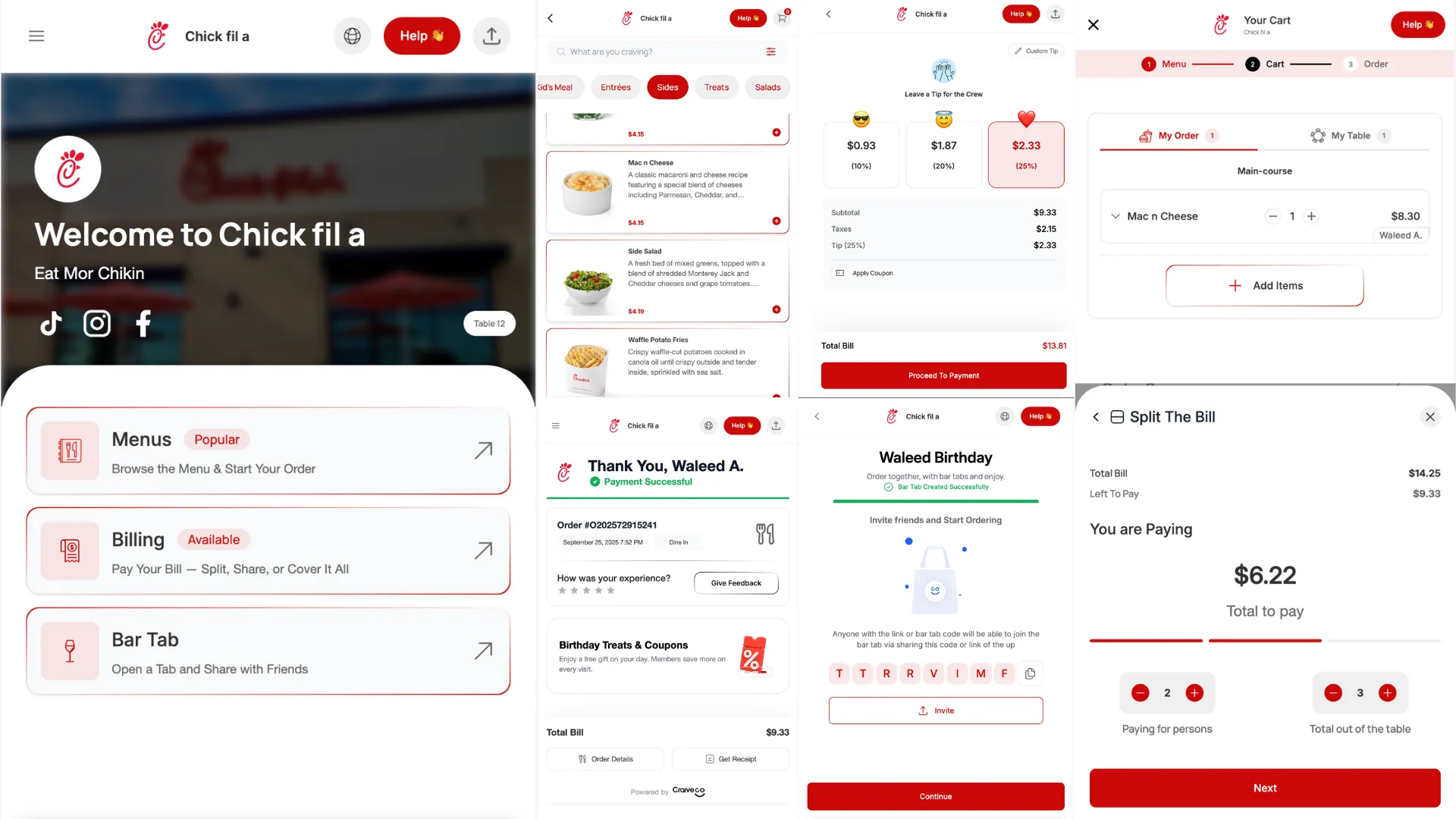
Craiveco Preview

Overview

Craiveco is a cutting-edge, multi-app restaurant management platform designed to revolutionize the dining experience. The platform consists of three interconnected applications that work seamlessly together to streamline restaurant operations, enhance customer satisfaction, and provide powerful analytics for business owners.

Performance Impact

Real-time WebSocket integration reduced operational delays by 30%, significantly improving communication between customers, staff, and kitchen operations.

Platform Architecture

The Craiveco ecosystem is built on three core applications:

Customer App

The customer-facing application provides an intuitive digital dining experience with:

  • Real-time order tracking - Monitor your order status from placement to delivery
  • Interactive digital menus - Browse items with detailed descriptions and images
  • Smart bill splitting - Easily divide bills among multiple guests
  • Push notifications - Get instant updates on order status
  • Seamless payments - Secure checkout with Stripe integration

Restaurant Staff App

A role-based dashboard system tailored for different staff positions:

  • Waiter Dashboard - Manage table assignments, take orders, and track service
  • Cashier Interface - Process payments, handle billing, and manage transactions
  • Chef Panel - View incoming orders, update preparation status, and manage kitchen workflow
  • Real-time synchronization - All changes reflect instantly across all devices

Owner Dashboard

Comprehensive analytics and management tools for restaurant owners:

  • Multi-branch management - Oversee operations across multiple locations
  • Sales analytics - Detailed reports on revenue, trends, and performance metrics
  • Staff oversight - Monitor employee performance and manage scheduling
  • Inventory tracking - Keep tabs on stock levels and optimize supply chain
  • Customer insights - Understand dining patterns and preferences

Key Features

Customer Experience

  • Digital Menu Browsing - High-quality images, detailed descriptions, dietary information
  • Order Customization - Modify dishes to suit preferences and dietary needs
  • Real-Time Updates - WebSocket-powered live order status tracking
  • Bill Splitting - Intelligent algorithms for splitting bills fairly
  • Payment Integration - Secure Stripe payments with multiple payment methods
  • Order History - Access past orders for quick reordering
  • Push Notifications - Stay informed about order progress

Staff Operations

Waiter Module

  • Table management and assignment
  • Order taking with item customization
  • Order status monitoring
  • Customer request handling

Cashier Module

  • Payment processing
  • Bill generation
  • Transaction history
  • Refund management

Chef Module

  • Kitchen display system
  • Order queue management
  • Preparation time tracking
  • Inventory alerts

Business Intelligence

  • Analytics Dashboard - Visual representation of key metrics
  • Sales Reports - Daily, weekly, monthly revenue analysis
  • Staff Performance - Track efficiency and productivity
  • Customer Analytics - Understand dining patterns and preferences
  • Multi-Branch Comparison - Compare performance across locations
  • Export Capabilities - Generate reports for accounting and planning

Technology Stack

Frontend Technologies

React JS - Component-based UI for customer and staff web apps

  • Modern hooks-based architecture
  • Optimized rendering with React.memo
  • Context API for state management

Tailwind CSS - Utility-first styling framework

  • Responsive design system
  • Custom theme configuration
  • Dark mode support

Redux Toolkit - State management solution

  • Centralized application state
  • RTK Query for API caching
  • DevTools integration

Framer Motion - Animation library

  • Smooth page transitions
  • Micro-interactions
  • Gesture handling

React Native - Cross-platform mobile development

  • Native performance
  • Platform-specific optimizations
  • Shared codebase between iOS and Android

Native Modules - Device feature integration

  • Push notifications
  • Camera access
  • Location services

Backend Technologies

Node.js + Express.js - Server-side runtime and framework

  • RESTful API architecture
  • Middleware-based request handling
  • Error handling and validation

MongoDB - NoSQL database for flexible data storage

  • Document-based data model
  • Horizontal scalability
  • Aggregation pipeline for analytics

Redis - In-memory caching layer

  • Session management
  • Real-time data caching
  • Pub/Sub messaging

Socket.io - Real-time bidirectional communication

  • Order status updates
  • Kitchen notifications
  • Live dashboard updates

Infrastructure & DevOps

Docker - Containerization for consistent environments AWS - Cloud hosting and storage services CI/CD Pipelines - Automated testing and deployment Firebase - Push notifications and analytics

Real-Time Communication

WebSocket Architecture

The platform uses WebSocket connections to ensure all apps stay synchronized in real-time. This eliminates manual refreshes and reduces order processing time significantly.

How It Works

Order Placement

Customer places an order through the mobile or web app. The order is instantly sent to the server via WebSocket connection.

Kitchen Notification

The chef's dashboard receives an immediate notification with order details. The system automatically queues orders based on preparation time.

Status Updates

As the chef updates order status (preparing, ready), all connected clients receive updates in real-time without polling.

Delivery Confirmation

Waiter marks the order as delivered, triggering a notification to the customer and updating analytics in the owner dashboard.

Payment Integration

The platform integrates Stripe for secure payment processing with support for:

  • Credit and debit cards
  • Digital wallets (Apple Pay, Google Pay)
  • Split payments across multiple cards
  • Automatic receipt generation
  • Refund processing
  • Payment analytics and reporting

Security First

All payment data is handled by Stripe's PCI-compliant infrastructure. No sensitive card information is stored on our servers.

Internationalization

The platform supports multiple languages through i18next integration:

  • Dynamic language switching
  • RTL (Right-to-Left) support for Arabic and Hebrew
  • Locale-specific date and currency formatting
  • Translation management system
  • Fallback language support

Performance Optimizations

Use Cases

Scenario 1: Busy Lunch Hour

During peak hours, multiple customers place orders simultaneously. The real-time system ensures:

  • Orders are queued efficiently in the kitchen
  • Wait times are accurately calculated and displayed
  • Staff can coordinate seamlessly without confusion
  • Customers receive timely updates on their order status

Scenario 2: Multi-Branch Operations

A restaurant chain with 5 locations uses Craiveco:

  • Owner monitors all branches from a single dashboard
  • Identifies top-performing locations
  • Spots inventory issues before stockouts occur
  • Analyzes customer preferences across locations

Scenario 3: Bill Splitting

A group of 6 friends dine together:

  • One person initiates the bill splitting
  • Each person selects their items
  • Shared items are divided equally
  • Everyone pays their portion through the app
  • No manual calculations needed

Project Structure

Getting Started

Access the Platform

Visit the Craiveco Customer App to experience the platform in action.

Scan QR Code

Each table has a unique QR code. Scan it with your phone camera to access the digital menu and start ordering.

Browse & Order

Explore the menu, customize your items, and place your order. Track its progress in real-time from the app.

Enjoy & Pay

Once your meal is served, review your bill, split if needed, and pay securely through the integrated payment system.

Frequently Asked Questions

Technical Highlights

Architecture Decision

The decision to use WebSockets over traditional HTTP polling reduced server load by 70% and improved response times from 2-3 seconds to near-instantaneous updates.

Performance Metrics

  • 30% reduction in operational delays
  • Real-time updates in under 100ms
  • 99.9% uptime SLA
  • Handles 1000+ concurrent users per instance
  • Sub-second page load times

Development Practices

  • Test-Driven Development - Comprehensive unit and integration tests
  • Code Reviews - All changes reviewed before merge
  • Continuous Integration - Automated testing on every commit
  • Continuous Deployment - Automated deployment to staging and production
  • Monitoring & Logging - Real-time error tracking and performance monitoring

Future Enhancements

  • AI-Powered Recommendations - Personalized menu suggestions based on preferences
  • Voice Ordering - Order through voice commands
  • AR Menu - Augmented reality menu visualization
  • Loyalty Program - Integrated rewards and points system
  • Advanced Analytics - Machine learning for demand prediction
  • Third-Party Integrations - Delivery service integration, table reservation systems

Try It Now

Experience Craiveco firsthand by visiting the live demo and exploring the Customer App features.